
Named Users
Introduction
The named user licensing option provides a way to control the number of specific users who are allowed to connect and use a specific server instance. The named user option allows a specific set of users to connect to a server. These “named” users must be part of the security of the database the user is connecting to and a member of the named users defined for the server instance.
Defining Named Users
An Olation administrator can define named users through the Olation studio. These users can be any of the following:
- Olation users from any of the databases currently open on the server
- Windows users are available on an accessible Windows domain
- Entra ID’s selected from available Azure domain
To edit named users select a server node in the database explorer in Olation Studio. Right-click and select the Named Users… Menu.
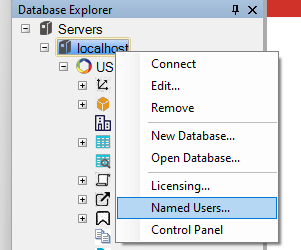
The named users apply to all databases open on the selected server. However, you can have the same named user reside in each database and that user counts as a single named user.
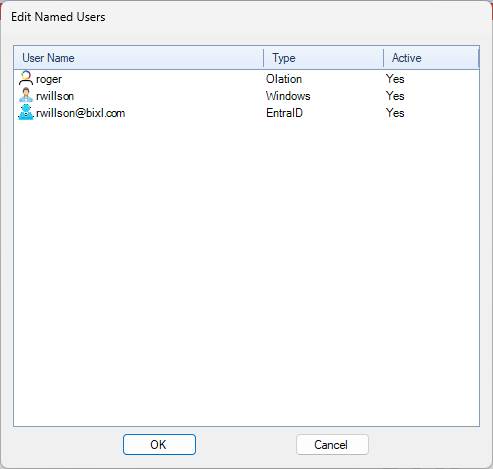
The named user dialog lists all existing named users along with their user type and active status. Right click on the list to edit the list.
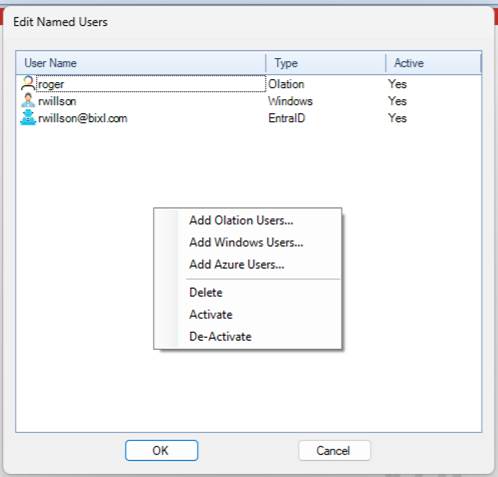
Here the user can add any of the three types of users, delete the selected users, or activate/deactivate the selected users. The mechanism for adding each user type is similar to adding users for fact security. However, only users can be added, no groups. The list of Olation users is an aggregation of all Olation users from the open databases.
Activating and de-activating users either allows or prevents them from authenticating through the named user server. This allows an administrator to keep a large set of users in the list without having to add and remove them each time they want to alter their named users.
When saving the named users the number of active users is checked against the max user limit specified in the Olation server license. If the number of active users exceeds the max limit specified then the user will not be able to save. The user must de-activate or delete enough users to be below the maximum user limit.
Configuration
Named users are saved in the C:\ProgramData\Olation folder under either the default file name NamedUsers.cfg or a specified filename as determined by the NamedUsers setting in the instances.cfg file. The file is a simple format with a section for each named user.
[roger]
active=true
location=OLATION
olationID=2
[rwillson]
active=true
location=WINDOWS
sid=S-1-5-21-110245835-3416859763-877549165-1001
[rwillson@bixl.com]
active=true
location=AZURE
sid=c1647085-d0bc-4d9a-a9f2-fddea1401b7f
This file can be manually updated but must have the correct OlationID and sid values for the specified users. If the number of active users in this file exceeds the named user limit then only the top N users will be considered active.
Licensing
The “DefinedUsers” license option has been changed to “NamedUsers”. This option had previously been used to limit the number of users that could be defined in fact security. These restrictions have been removed. The new feature determines whether the server requires and limits access to the server based on the named users setup for the server. Databases that are open on a named user server that do not have security enabled cannot be accessed by a client.